
FY27 Microsoft Security Incentives: A Practical Guide for Microsoft Partners
Microsoft’s FY27 Security incentives can support far more than a license sale. Eligible Microsoft partners may be able to earn incentives for security assessments, proofs of concept, deployments, competitor replacement, product adoption, usage growth, and Azure security consumption.
The portfolio includes 11 main opportunities, with individual engagements reaching a maximum published value of up to $112,500. These figures can attract attention, but they are not guaranteed payments. Each offer has its own rules for partner eligibility, customer eligibility, delivery, measurable outcomes, evidence, and claim submission.
This guide explains the FY27 Microsoft Security incentive opportunities in clear terms. It also shows what partners should check before they nominate a customer, define a project, or discuss possible funding.
Table of Contents
- Key takeaways
- How FY27 Microsoft Security incentives work
- The FY27 Security incentive journey
- The 11 main incentive opportunities
- What “up to” really means
- Partner and customer eligibility
- Evidence and Proof of Execution
- Why claims are rejected or expire
- A practical 10-step process
- Frequently asked questions
- Final checklist and official resources
Key Takeaways
- FY27 Security incentives cover both pre-sales and post-sales work.
- The customer journey can include Envision, Deploy, Convert, Increase Usage, and Increase Consumption.
- Published amounts show the maximum earning opportunity, not a fixed payment.
- Both the partner and the customer must qualify for the selected engagement.
- Some offers require a completed deployment. Others also require measurable usage, protected-user, conversion, or Azure consumption results.
- Proof of Execution should be planned before delivery and collected throughout the project.
- Partner Center is the operational source for eligibility, customer consent, claims, and status updates.
How FY27 Microsoft Security Incentives Work
Microsoft Security incentives are managed through Microsoft Commerce Incentives (MCI). Eligible partners use Partner Center to review earning opportunities, add or claim customers, obtain customer consent, upload evidence, submit claims, and monitor the results.
If your team is new to this process, Alif’s guide to partner incentive enrollment in Partner Center explains the roles, invitation process, validation steps, and enrollment status.
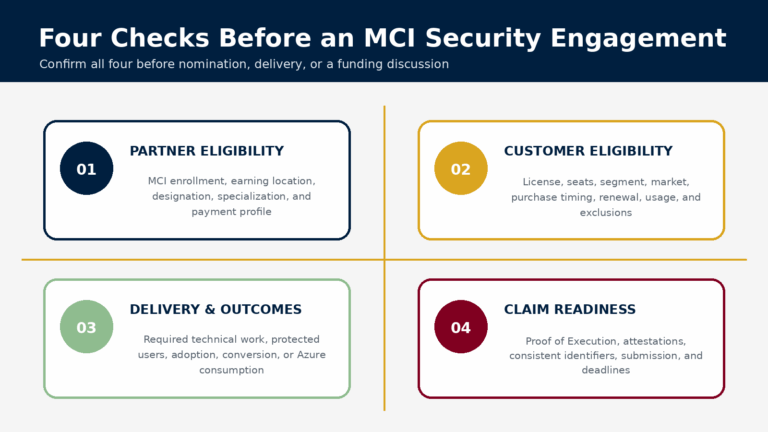
Every opportunity involves four separate checks:
Check | What the partner must confirm |
Partner eligibility | The correct earning location has the required MCI enrollment, designation, specialization, payment profile, and other qualifications. |
Customer eligibility | The customer meets the rules for licenses, seats, purchase channel, segment, renewal timing, usage, or Azure consumption. |
Delivery and outcomes | The partner can complete the technical work and achieve the outcome defined in the Delivery Guide. |
Claim readiness | The team can provide accurate evidence, attestations, and a complete claim before the deadline. |
An eligible partner does not make every customer eligible. An eligible customer also does not mean that every partner location can claim the opportunity. Confirm both sides before delivery begins.
For location-level guidance, read what the eligibility column and green icon mean in Partner Center.
The FY27 Security Incentive Journey
The portfolio supports different stages of the customer security journey:
Stage | Purpose |
Envision | Assess security needs, identify use cases, and demonstrate a suitable solution. |
Deploy | Migrate, configure, implement, and support adoption of eligible Microsoft Security workloads. |
Convert | Replace an approved competing product after completing the related Microsoft deployment. |
Increase usage | Improve active use of eligible Microsoft 365 security or data-security capabilities. |
Increase consumption | Deploy Microsoft Sentinel or Defender for Cloud and achieve the required Azure consumption outcome. |
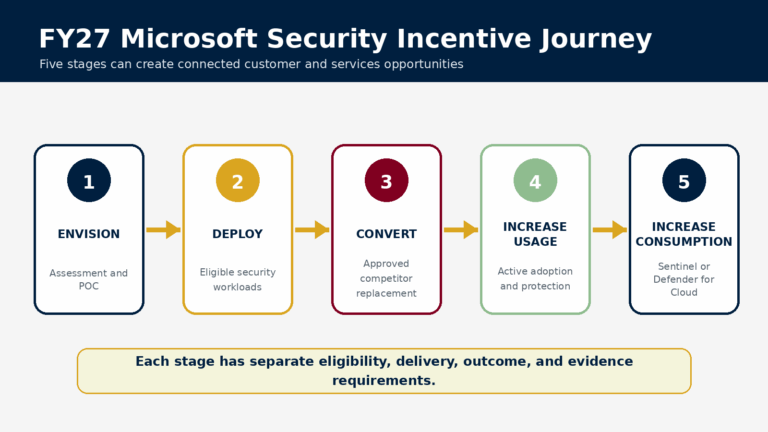
These stages can create a connected services journey, but they are not automatically bundled. A customer who completes an envisioning engagement must still qualify separately for a deployment or conversion offer.
The FY27 Microsoft Security Incentive Opportunities
Envisioning and Deployment Offers
1. Security Envisioning and POC - Up to $15,000
This pre-sales engagement helps an eligible customer assess security priorities, explore relevant Microsoft solutions, and test a selected use case through a proof of concept. The evidence should show the customer need, the work completed, the solution demonstrated, and the agreed next steps. It should not be treated as a full production deployment.
2. CSP Microsoft 365 E5/E7 Deployment Accelerator - Up to $50,000
This offer supports eligible migration, deployment, and adoption work for new Microsoft 365 E5 or E7 seats purchased through CSP. A project may include environment preparation, workload configuration, migration, policy implementation, and user or device onboarding.
License eligibility alone is not enough. Nomination timing and the required deployment or protected-user outcome also matter.
3. CSP Defender and Purview Suites Deployment Accelerator - Up to $17,000
This engagement supports eligible Defender and Purview deployment and adoption. Work may cover endpoint, identity, email, data protection, data loss prevention, insider risk, or related capabilities. The evidence should connect the license purchase, technical configuration, onboarding, and measurable use of the eligible workloads.
4. Business Premium Security Suites Deployment Accelerator - Up to $2,000
This offer supports eligible small and medium-sized customers using Microsoft 365 Business Premium security suites. It can have different customer, seat, and outcome rules from the enterprise offers.
A lower payment does not mean lighter delivery or evidence standards. Partners should compare the available earning opportunity with the effort required.
Competitor Conversion Bonuses
Conversion bonuses reward eligible migrations from named competing products. The related Microsoft deployment generally needs to be completed. The partner must also prove that the approved competitor was active and was replaced.
Conversion offer | Approved competitor stated in the FY27 narrative | Maximum published opportunity |
Microsoft 365 E5/E7 Conversion Bonus | CrowdStrike or Proofpoint | $40,000 |
Defender and Purview Suites Conversion Bonus | CrowdStrike | $13,600 |
Business Premium Conversion Bonus | SentinelOne | $1,600 |
Useful evidence may include screenshots from the previous platform, customer confirmation, migration records, deployment reports, and proof that the Microsoft workload replaced the former solution. A general statement that the customer used a competitor is unlikely to be enough.
Usage and Azure Consumption Accelerators
1. XDR Usage Accelerator - Up to $50,000
This offer focuses on eligible enterprise customers who own Microsoft 365 E5 security capabilities but do not use enough of the available Defender workloads. The partner may need to remove adoption barriers and increase the required measure, such as Monthly Protected Users, before an eligible renewal.
2. Data Security Usage Accelerator - Up to $50,000
This engagement focuses on increasing active use of eligible Microsoft Purview data-security capabilities. Work may include data discovery, classification, information protection, data loss prevention, or insider-risk processes. The result must be measurable. Configuration activity alone may not satisfy the earning requirement.
3. Microsoft Sentinel Deployment Accelerator - Up to $112,500
This offer supports eligible Sentinel deployment, migration, data-source connection, detection rules, incidents, workbooks, automation, and security operations improvements.
Payment is generally divided between successful deployment and Proof of Execution approval, and achievement of the required annualized Azure Consumed Revenue target. A technically complete deployment may therefore earn only part of the maximum amount if the consumption target is not reached.
4. Microsoft Defender for Cloud Deployment Accelerator - Up to $75,000
This accelerator supports eligible cloud-security posture management and workload protection across cloud or hybrid environments. The project may cover servers, containers, applications, data resources, or infrastructure security.
Like Sentinel, it includes an Azure consumption component. Partners should confirm that the customer’s environment can realistically support the required outcome.
FY27 Security Incentive Amounts at a Glance
Offer | Maximum published opportunity |
Security Envisioning and POC | $15,000 |
Microsoft 365 E5/E7 Deployment | $50,000 |
Defender and Purview Suites Deployment | $17,000 |
Business Premium Security Deployment | $2,000 |
Microsoft 365 E5/E7 Conversion | $40,000 |
Defender and Purview Suites Conversion | $13,600 |
Business Premium Conversion | $1,600 |
XDR Usage Accelerator | $50,000 |
Data Security Usage Accelerator | $50,000 |
Microsoft Sentinel Deployment | $112,500 |
Microsoft Defender for Cloud Deployment | $75,000 |
These figures are maximum published earning opportunities. Eligibility, payment, and delivery requirements vary by engagement.
What "Up To" Really Means
The figures above are maximum earning opportunities. The final amount may depend on:
- Eligible seat count and customer size
- Customer market classification
- Qualifying license, subscription, and purchase channel
- Partner qualifications and earning location
- Completed delivery milestones
- Active usage or protected-user growth
- Competitor displacement evidence
- Azure Consumed Revenue results
- Approval of evidence and attestations
The FY27 narrative includes different payment levels for Markets A, B, and C. Partners should use the market classification shown for the individual opportunity in Partner Center. They should not assume the highest payment applies based only on the customer’s country.
For a wider view of incentive planning across the Microsoft customer lifecycle, see Alif’s Microsoft Commercial Partner Incentives guide.
Who May Be Eligible?
Basic partner requirements may include an active Microsoft AI Cloud Partner Program agreement, MCI enrollment, an eligible earning location, and complete payment and tax profiles.
Some offers also require a Security Solutions Partner designation or Security specializations such as Cloud Security, Identity and Access Management, Threat Protection, or Data Security. The Sentinel offer identifies the Threat Protection specialization, while Defender for Cloud identifies Cloud Security. Usage Accelerators may include advanced requirements such as MISA membership, an MXDR Verified Practice, and qualifying Security specializations.
Always check the exact partner location that will deliver and claim the work. Organization-level qualifications do not automatically make every location eligible.
Customer Eligibility Questions to Check First
Before discussing funding or starting delivery, confirm:
- License and purchase: Is the exact product eligible? Must the purchase be new, incremental, annual, or completed through CSP? Does the customer meet the seat threshold?
- Segment and market: Is the customer’s segment included? Which market classification appears for the opportunity?
- Usage and renewal: Does the customer meet current-usage thresholds? Is an eligible renewal within the required period?
- Consumption: Can the Sentinel or Defender for Cloud environment reach the required Azure consumption level?
- Timing: Must nomination happen before the sale, or is a limited post-provisioning window available?
- Existing claims: Is another claim already active or approved for the same customer or tenant?
These checks should happen during opportunity planning. If they are delayed until claim preparation, the nomination or delivery window may already have closed.
Evidence and Proof of Execution
The selected Delivery Guide determines the exact evidence required. Common items include:
- Proof of Execution
- Partner invoice, when required
- Customer and partner attestations
- License, subscription, and seat evidence
- Deployment records and screenshots
- Usage or protected-user reports
- Azure consumption evidence
- Competitor conversion evidence
Strong Proof of Execution explains what changed because of the partner’s work. It should identify the customer, eligible workload, original situation, project dates, partner activities, users or resources involved, technical changes, and measurable result.
Avoid descriptions such as “deployed Microsoft Security.” A stronger record names the product, states what was configured, gives the number of users or devices onboarded, identifies the project dates, and shows the resulting usage or protection level.
Collect evidence during delivery. Trying to recreate screenshots, dates, approvals, and measurements after the project has ended often creates gaps or inconsistencies. Microsoft’s MCI claim best practices provide workload-specific guidance on measurable evidence.
Why MCI Security Claims Are Rejected or Expire
Common problems include:
- Eligibility was checked after the sale or nomination window.
- The selected engagement did not match the license, customer, or intended outcome.
- Proof of Execution was too general or did not show the claiming partner’s role.
- Tenant IDs, subscription IDs, workloads, dates, or quantities did not match across documents.
- Required usage, protected-user, conversion, or consumption outcomes were not achieved.
- Customer consent or attestation was not completed on time.
- Evidence was uploaded, but the claim remained in Draft and was never submitted.
- A Partner Action Required request was missed or not resubmitted.
- The claim expired before all required steps were completed.
Good technical delivery does not protect a claim from weak administration. Eligibility, evidence, deadlines, and claim ownership must be managed with the same care as the technical work.
Microsoft’s guidance on submitting an MCI engagement claim explains that uploading documents is not the final step. The partner must submit the claim and respond to Action Required requests before the applicable deadline.
A Practical 10-Step Process for FY27 Security Engagements
- Confirm partner eligibility. Check MCI enrollment, the earning location, payment profiles, designations, specializations, and advanced qualifications.
- Validate the customer. Review the agreement, license, seats, subscription term, segment, market, usage, renewal, and exclusions.
- Select the correct engagement. Match the offer to the customer’s real situation, not simply the highest advertised amount.
- Read the current Delivery Guide. Confirm activities, outcomes, deadlines, evidence templates, payment calculations, and claim limits.
- Add or claim the customer. Follow the process shown for the opportunity in Partner Center.
- Obtain customer consent. Use an authorized contact and monitor the response before the deadline.
- Create an evidence plan. Assign owners for screenshots, reports, measurements, customer approvals, and final review.
- Deliver and measure. Complete the technical work and track the required usage or consumption outcome separately.
- Submit the claim. Check that identifiers, dates, workloads, and outcomes match, then complete the final submission action.
- Monitor the status. Respond quickly to Action Required requests and continue until the claim is approved, rejected, or formally closed.
Partners that want to connect incentives with broader alliance and delivery planning can also read MCI Engagement Mastery.
Frequently Asked Questions
Are the FY27 Security incentive amounts guaranteed?
No. The published figures are maximum earning opportunities. The final payment can depend on partner and customer eligibility, market classification, seat count, delivery milestones, usage or consumption results, evidence quality, and claim approval.
Can a partner claim an engagement after delivery has started?
It depends on the selected engagement. Some offers require nomination before the sale or within a limited period after provisioning. Check the current Delivery Guide and the customer opportunity in Partner Center before work begins.
What should an MCI Proof of Execution include?
It should clearly connect the customer, eligible workload, project scope, dates, partner activities, users or resources, technical changes, and measurable outcome. Supporting evidence may include screenshots, reports, project documents, customer confirmation, and usage or consumption records.
What if a partner lacks the security delivery capacity for an eligible opportunity?
The partner can add qualified capacity through a white-label delivery model while retaining the customer relationship. Alif supports Microsoft partners through Microsoft Alliance services, cybersecurity delivery, and technical resource outsourcing.
Final FY27 Security Incentive Checklist
Before starting an engagement:
- Confirm partner and earning-location eligibility.
- Validate the customer, license, seats, segment, and market.
- Check nomination, consent, delivery, and claim deadlines.
- Read the latest Commercial Incentives Guide and Delivery Guide.
- Confirm that the required technical and measurable outcomes are realistic.
- Assign owners for delivery, evidence, customer follow-up, and the claim.
- Use current Proof of Execution and attestation templates.
- Check all customer, tenant, subscription, and partner identifiers.
- Submit the claim before it expires and confirm it is no longer in Draft.
- Monitor Partner Center for review comments and action requests.
Where to Verify Current Requirements
Partners should review:
- The latest Microsoft Commercial Incentives Guide
- The current Delivery Guide for the selected offer
- Partner and customer eligibility shown in Partner Center
Final Perspective
FY27 Microsoft Security incentives can help partners start customer conversations and support assessments, deployments, migrations, usage growth, and cloud-security adoption. But the headline amount is only one part of the opportunity.
The strongest approach is to plan backward from the required outcome. Confirm eligibility before the transaction. Read the Delivery Guide before defining the scope. Build evidence collection into delivery. Track usage or consumption throughout the engagement. Then monitor the claim until the process is complete.
When these steps are managed together, the opportunity can create more than a one-time incentive payment. It can lead to remediation projects, wider Microsoft Security adoption, ongoing optimization, and long-term managed services.
If your team needs additional capacity, Alif can support eligible Microsoft Security engagements behind your brand, from assessments and technical delivery to documentation and ongoing managed services.